


Voice GPS & Driving Directions
4.12.21K Reviews
App Specs
- Version
- 3.4.6
- Updated On
- License
- Free
- Downloads
- 10,000,000+
- Developer
- Delta Raza Studio
- Categories
- Maps & Navigation
- Platform
- Android
Screenshots
 Analysis by AppCompare
I often share a car with other people, and that changes what I want from a navigation app. It needs to get a driver to the right place without turning the phone into a group project: one person can choose the route, while someone else handles the music or keeps an eye on the next turn. Voice GPS & Driving Directions is built around spoken guidance, so its most useful role in a household is as a straightforward route companion rather than a place to manage everyone’s travel.
One phone, several drivers
For a shared vehicle, I’d treat the phone as the driver’s temporary tool, not as a permanent record of where the household goes. Whoever is driving can enter the destination before setting off, then let the voice instructions handle the main prompts. That keeps the screen from becoming a distraction and avoids passing the phone around while the car is moving. If a passenger needs to help, they can take care of destination entry or map checks while the driver stays focused on the road.
This arrangement is especially handy when one person knows the general area but another is unfamiliar with the final few streets. A spoken turn instruction can be more practical than trying to explain a sequence of intersections from memory. I would still agree on the destination and route before leaving: voice navigation helps with directions, but it cannot settle household questions such as which entrance to use or where to meet.
Keep setup and accounts deliberate
Location access is central to navigation, so I would review the phone’s permission choices rather than approving prompts without thinking. On a shared device, it is worth checking which person is signed in to the phone and which contacts or calendar details are available there. The original experience described for the app includes using saved contact addresses and calendar plans, which can be convenient, but that convenience is best reserved for a device whose user understands what information is being accessed.
If several people use one phone, avoid assuming that one person’s saved places or appointments should automatically be used by everyone. A driver can enter an address manually instead, which is a simple boundary when the device is shared. I also recommend setting the destination while parked; voice commands may reduce the need to touch the screen, but they are not a reason to interact with a phone in a way that distracts from driving.
Coordination without overcomplicating the trip
For everyday coordination, the app can sit in the middle of a simple plan: one person shares an address verbally, the driver enters it, and the group agrees on a meeting point before departure. If traffic causes a change of route, the person navigating can tell passengers what to expect without making the driver interpret a map at speed. That is a small workflow, but it prevents the familiar back-seat debate over whether the next turn was missed.
Offline maps are also useful to think through before a shared outing. If the trip includes a stretch where mobile data may be unreliable, downloading the needed map in advance can reduce dependence on a live connection. I would do this while connected and check that the relevant area is covered before leaving, rather than discovering the gap halfway through a drive. Offline preparation is a backup, not a substitute for planning a destination or checking conditions along the way.
Worth Reading Before You Choose

EA SPORTS FC Mobile 26 Is a Bigger Football Game, but It Takes Time

Flipboard Shows What News Apps Must Do Beyond the Feed

Switching to Android Auto Means Rethinking Your Driving Routine

Google Calendar Makes a Crowded Week Easier to Manage

Ludo King Makes the Most of the Minutes Between Plans

Baby Panda World Brings Quick Play to Modern Phones, but Its Game Library Feels Busy
Age, trust, and the driver’s responsibility
The app is rated for Everyone, but that describes its content context; it does not make every driving situation appropriate for every age. A young passenger can listen to directions or help a driver who is parked, while operating a vehicle remains a separate matter governed by local rules and the driver’s qualifications. For families, I would keep the device with the responsible driver and avoid treating navigation access as a reason for a child to handle the phone in motion.
Voice prompts can make a trip feel easier, but I still treat them as guidance rather than unquestionable instructions. Road signs, closures, and safe driving conditions take priority. If a direction sounds unsafe or conflicts with what is visible on the road, I would ignore it and choose a safe place to reassess. That judgment matters more than any route suggestion, especially when several people in the car are relying on the driver.
Getting Started with Voice GPS & Driving Directions
First things first, downloading and installing the app is a breeze. Available for both Android and iOS, you can snag it from the Google Play Store or Apple App Store. Once installed, the app greets you with a sleek, user-friendly interface that's incredibly intuitive. No need to be a tech wizard to navigate through this one!
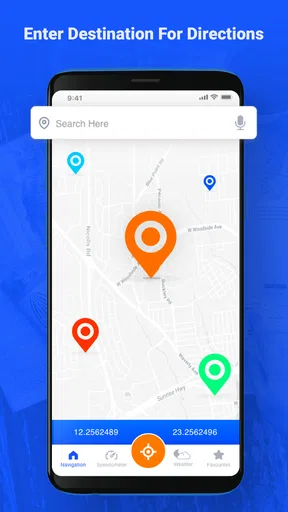
After a quick setup where you grant the necessary permissions (because, duh, a GPS app needs access to your location), you're all set to hit the road. The app offers a simple layout with options to enter your destination manually or use voice commands. I found the voice feature a particularly nifty addition, allowing me to keep my hands on the wheel and eyes on the road.
Features that Stand Out
One of the standout features of Voice GPS & Driving Directions is, unsurprisingly, its voice guidance. It's like having a friendly navigator sitting next to you, calmly directing you through every twist and turn. The voice is clear, precise, and available in several languages, which is a major plus if you're multilingual or traveling abroad.
The app doesn't just stop at voice directions. It offers real-time traffic updates, which are a lifesaver during rush hour. Imagine getting a heads-up about a traffic jam ahead and being rerouted automatically! It’s like having insider info about the roads, helping you avoid unnecessary delays.
Another feature I absolutely love is the offline maps. You can download maps in advance, which is perfect for those times when your data connection decides to take a vacation. Whether you're navigating through the city or exploring the countryside, this feature ensures you’re never lost, even when you’re off the grid.
The User Experience
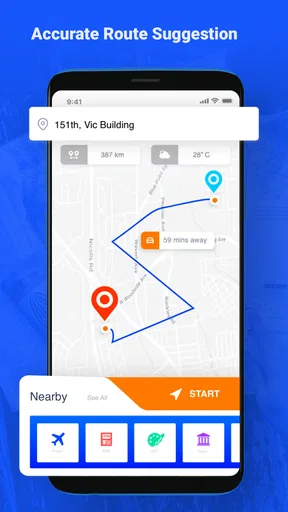
Using Voice GPS & Driving Directions feels like a smooth ride. The map graphics are clear and easy to interpret, even at a glance. Routes are highlighted distinctly, and you can zoom in and out effortlessly to get a better view of your surroundings. Plus, the app is incredibly responsive, with minimal lag, which is crucial when you need directions pronto.
Battery consumption is often a concern with GPS apps, but I found this one to be fairly efficient. It didn't drain my battery excessively, even during longer trips. That’s a relief because the last thing you want is to choose between navigating or conserving battery life.
The app also integrates well with your calendar and contacts, making it super convenient to navigate to your next meeting or a friend’s place. Just tap on the address from your contact list, and voila, you’re on your way!
Choosing it over familiar navigation apps
Maps & navigation apps usually compete on different strengths: some people want a familiar map packed with place details, while others care most about spoken turn prompts or having an area available offline. I would consider this app when I want a voice-led drive and a simple route screen, especially if I have prepared the map before travelling. If my day depends on comparing several destinations, checking lots of place information, or coordinating a complex itinerary, I would also consult a more established map service rather than assuming one navigator will answer every question.
That is not a knock against this app; it is a useful way to choose the right tool. Traffic information can help with a commute, but it should not be treated as a promise that a faster route will always appear or that every disruption will be reflected immediately. For a routine trip, I would start navigation before departure, listen to the prompts, and use my judgment if road conditions do not match the suggested path.
Practical habits for longer drives
A small bit of preparation makes the offline-map option more dependable. Before a trip, I would download the area I expect to cross, confirm the destination spelling, and check that the route makes sense while parked. If the journey crosses several regions, I would think about the full route rather than only the first stop. This is a useful distinction: a saved map can help when data drops, but it does not remove the need to plan for where the journey goes.
For a daily commute, I would use traffic guidance as a prompt to consider alternatives, not as a reason to make a last-second turn. If the app reroutes, let it announce the change and decide when it is safe to follow. In an unfamiliar city, a passenger can watch the map around complicated junctions while the driver listens for the next instruction. That division of attention is more sensible than repeatedly zooming the screen while driving.
Who will get the most from it?
I can see this being a good fit for drivers who prefer spoken directions, want a clear route view, and sometimes travel where a connection may be patchy. It also suits people who are comfortable doing a little preparation before a longer drive. The combination of voice guidance, traffic information, and offline maps gives it a practical mix for commuting and occasional trips, rather than limiting it to one kind of journey.
I would be more cautious if I needed a navigation app to serve as a complete travel planner, or if I rarely want to grant a navigation app access to location information. Anyone who relies heavily on the phone’s contacts and calendar should think about whether those conveniences are appropriate on a shared device. And if your phone is older, check compatibility before installing: the current version is 3.4.6 and requires Android 6.0 or later on Android.
Cost, reputation, and everyday expectations
The app is free to download, with in-app purchases listed from $1.99 to $19.99 per item. I would treat that as a reason to check any purchase screen carefully, not as evidence that a paid item is necessary for basic navigation. If you are only trying it for a familiar commute, begin with the free experience and decide whether it suits your routine before spending anything.
It comes from Delta Raza Studio and has an average rating of 4.2 from around 15,000 ratings, with roughly 2,200 written reviews and over 5 million installs. Those figures suggest that it has reached a broad audience, but they cannot tell me whether it will behave exactly as I need on a particular phone or route. I would judge it by a short, familiar drive first, then rely on it for a less familiar journey once I am comfortable with its controls and voice prompts.
Final Thoughts
All in all, Voice GPS & Driving Directions is a must-have for anyone who spends a significant amount of time on the road. Its combination of voice-guided navigation, real-time traffic updates, and offline capabilities make it a dependable tool for everyday commuters and adventurers alike.
Whether you're heading to a new city, planning a road trip, or just trying to get to work faster, this app has got your back. So why not give it a whirl? You might just find that it's the co-pilot you never knew you needed.
A household verdict
For a household that shares a car, I see the best use as one driver, one agreed destination, and voice directions that reduce the need to handle the phone on the road. The app can make familiar errands and unfamiliar final turns easier to coordinate, while the offline-map option rewards a little planning. Its limits are just as important: it is not a substitute for safe driving, careful permission choices, or a second source of information when a trip has complicated requirements.
Delta Raza Studio’s navigation app is free to try and rated for Everyone, so it is approachable for a broad range of users; in-app purchases are available, so I would pay attention to prompts before confirming anything. My recommendation is straightforward: try it on a route you already know, learn how its voice and map work for you, and then decide whether it deserves a place in your shared-car routine. If your priority is a highly detailed trip-planning ecosystem, another familiar maps app may suit you better. If clear spoken guidance and preparation for weak connectivity matter more, this one is worth considering.
Pros
- Accurate real-time navigation updates.
- User-friendly interface with clear visuals.
- Supports multiple languages effortlessly.
- Integrates seamlessly with music apps.
- Offline maps available for data saving.
Cons
- Battery consumption is relatively high.
- Occasional lag in densely populated areas.
- Ads can be intrusive during navigation.
- Limited voice customization options.
- Requires frequent updates for accuracy.
FAQs for Voice GPS & Driving Directions
How accurate is the Voice GPS & Driving Directions app?
The Voice GPS & Driving Directions app is designed to provide highly accurate navigation by using real-time GPS data. It continuously updates your route based on traffic conditions and road closures. However, accuracy may vary depending on your device's GPS capabilities and network connection quality.
Does the app require an internet connection to function?
While basic GPS functions can work offline, Voice GPS & Driving Directions relies on an internet connection for real-time traffic updates, map downloading, and address lookup. For optimal performance, especially in areas with complex routes or heavy traffic, a stable internet connection is recommended.
Is the app compatible with both Android and iOS devices?
Yes, Voice GPS & Driving Directions is available for both Android and iOS platforms. It is optimized to work seamlessly across a variety of devices, ensuring users have a consistent experience whether they're using a smartphone or tablet.
What features make this app stand out from other navigation apps?
Voice GPS & Driving Directions offers unique features like real-time traffic alerts, lane guidance, and customizable voice instructions. It also supports offline maps and integrates seamlessly with other apps for easy route sharing. These features enhance user convenience and safety during navigation.
Is the app free to use or does it have in-app purchases?
The app is free to download and use for basic navigation features. However, it offers premium features and ad-free experiences through in-app purchases. Users can choose to upgrade for additional functionalities, such as advanced traffic data and personalized routes.


